Product information blocks
Updated Oct 27, 2026 · 1 min read
Add, remove and reorder the blocks in the information column.
Blocks
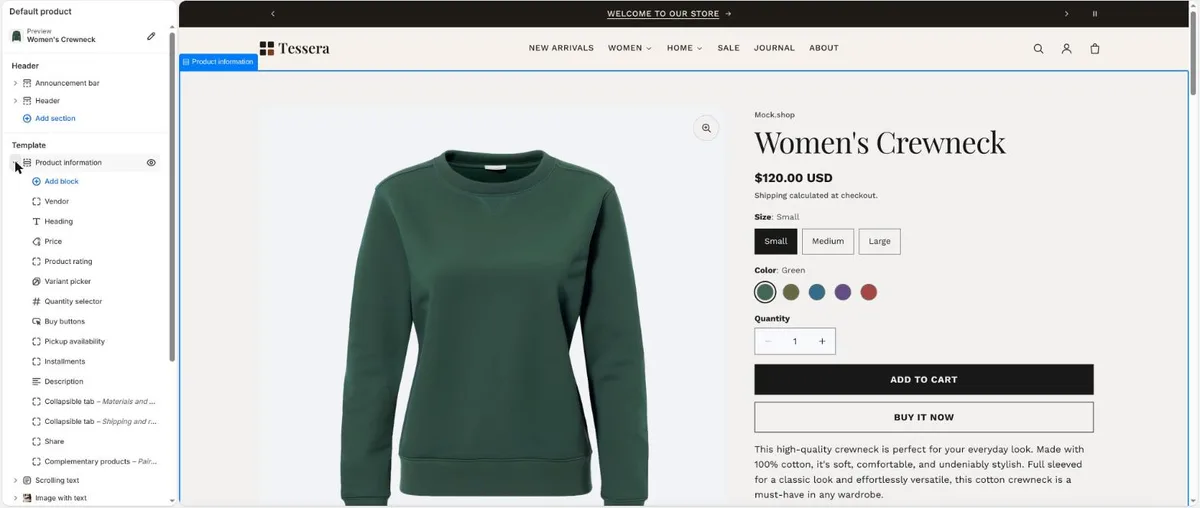
- Vendor, Heading, Price: Brand, title, and price with compare-at and unit price.
- Product rating: Stars from a reviews app that writes the reviews.rating metafield.
- SKU and Inventory status: Variant SKU; in stock, low stock or sold out with a low stock threshold.
- Variant picker: Buttons or dropdown, with swatches.
- Quantity selector: Quantity, with quantity rules and volume pricing when set.
- Buy buttons: Add to cart, dynamic checkout, subscriptions and the gift card recipient form.
- Pickup availability and Installments: Store pickup for the variant, and the Shop Pay installments message.
- Description, Collapsible tab, Pop-up: Tabs and pop-ups can read their content from a page, so a size chart is maintained once.
- Share, Complementary products, Icons with text: Copy-link sharing, products from Search & Discovery, and shipping or returns notes.
- Custom Liquid: Code or app snippets.
Was this article helpful?
Related articles
Still need help?
Contact support